GSoC 2026: Week 1 & 2 - Building the Foundation
These first few weeks were all about getting familiar with the existing codebase and project documentation.
Since it was my first time contributing to a large scale project, I wanted to be sure on the
specifics of my project as well as try to follow the goals as close as I could.
During the community bonding period, in a meeting with my mentors, we had decided upon the project
structure and that the entire project would be a single, long-running PR.
Based on these discussions, I created the GSoC 2026: Interface for post-simulation analysis (“crawling”) of WESTPA simulations PR
and added some of the files required for this project. With this complete, it was time to start writing code.
Before diving into the core logic, I needed to set up the basic skeleton for the tool. This was fairly straightforward:
- I added an entry point to setup.py to allow the w_mdacrawl CLI tool to run from the command line.
- I created the initial Python files to house the project: w_mdacrawl.py (which will eventually hold the CLI logic) and mdacrawl.py (which currently holds the core parsing logic).
- I also created the files for the test cases: test_mdacrawl.py.
The primary goal for these two weeks was getting the WESTPAParser class fully functional.
WESTPA stores its weighted ensemble data in a highly specific hierarchical format inside a west.h5 file. To make this data useful for post-simulation analysis,
I needed to build a parser that could open this HDF5 file, extract the relevant system information, and map it into MDAnalysis Topology.
I achieved this by opening the main west.h5 file, navigating to the linked trajectory segment file and extracting the raw topology data from there.
def parse(self, **kwargs):
    # Navigate the WESTPA iteration hierarchy to find the topology file
    with h5py.File(self.filename, 'r') as f:
        iter_prec = f.attrs['west_iter_prec']
        first_iter_name = f'iter_{1:0{iter_prec}d}'
        iter_group = f[f'iterations/{first_iter_name}']
        traj_filename = iter_group['trajectories'].file.filename

    # Extract the raw topology byte data from the linked file
    with h5py.File(traj_filename, 'r') as f:
        topo_raw = f['topology'][()]
I then iterated through each part of the topology and extracted the required information.
for chain in data['chains']:
    for residue in chain['residues']:
        resnames.append(residue['name'])
        resids.append(residue['resSeq'])
        residue_segindex.append(seg_idx)
        for atom in residue['atoms']:
            atom_names.append(atom['name'])
            elements.append(atom['element'])
            atom_resindex.append(res_idx)
        res_idx += 1
    seg_idx += 1

for bond in data['bonds']:
    bonds.append(tuple(bond))
Finally, the Topology object was created and returned.
return Topology(
    n_atoms=n_atoms,
    n_res=n_res,
    n_seg=n_seg,
    attrs=[
        Atomnames(np.array(atom_names, dtype=object)),
        Atomids(np.arange(n_atoms, dtype=np.int32)),
        Resids(np.array(resids, dtype=np.int32)),
        Resnames(np.array(resnames, dtype=object)),
        Elements(np.array(elements, dtype=object)),
        Segids(np.array([str(i) for i in range(n_seg)], dtype=object)),
        Masses(mass_values),
        Bonds(bonds),
    ],
    atom_resindex=np.array(atom_resindex, dtype=np.int32),
    residue_segindex=np.array(residue_segindex, dtype=np.int32),
)
With the parser working, we can now successfully create a MDAnalysis universe directly from a WESTPA output file.
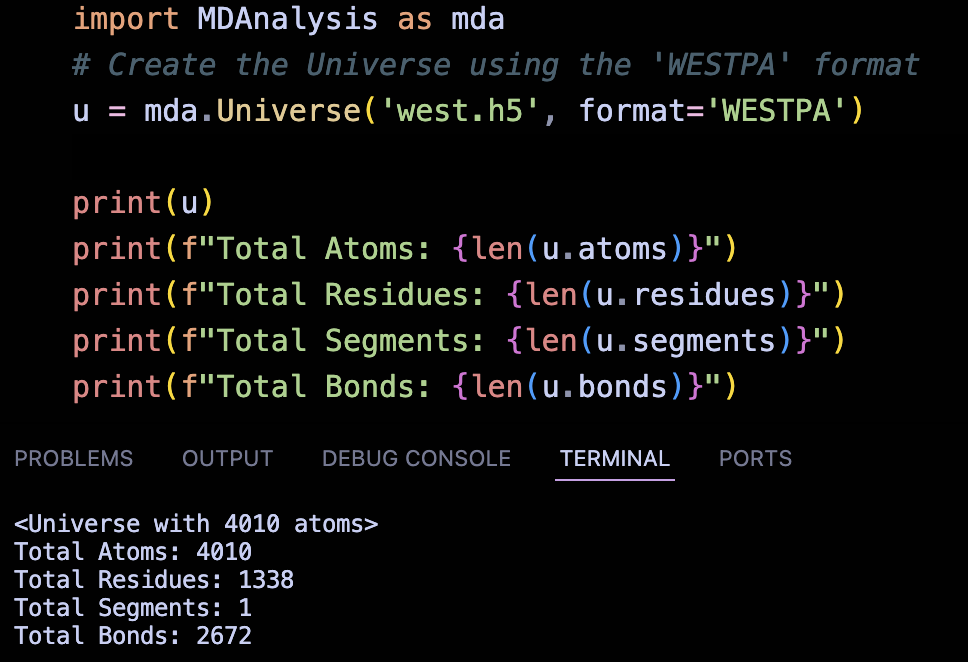
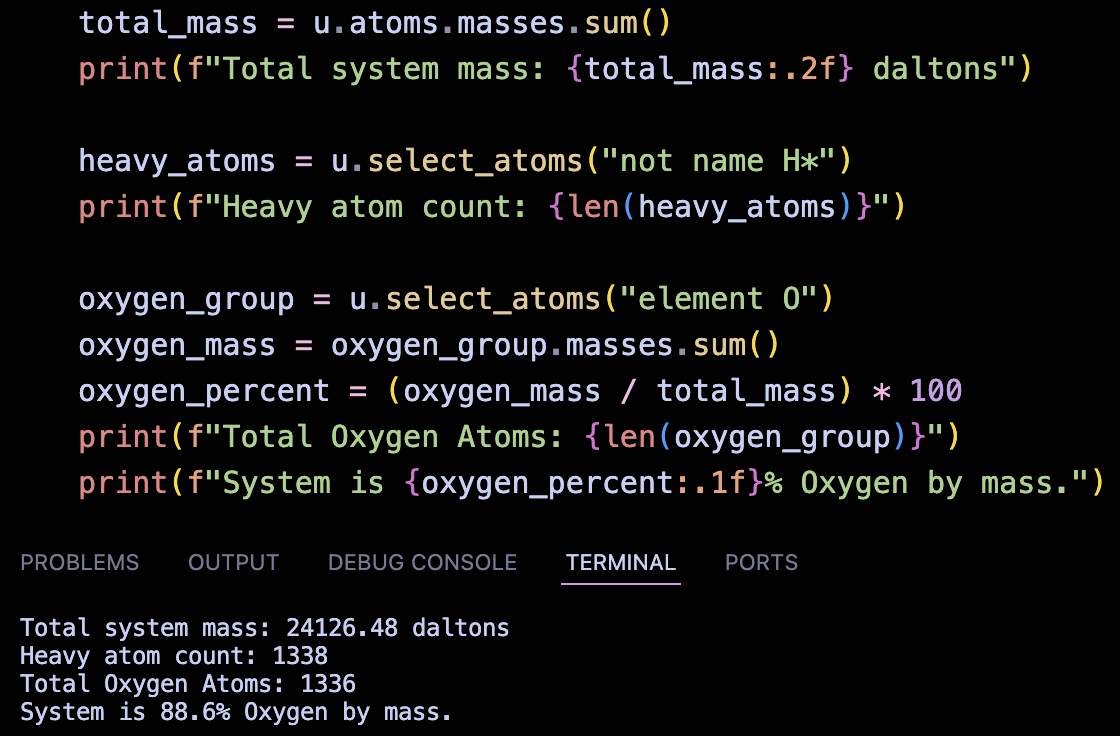
Once the universe is created, we have unlocked MDAnalysis’s powerful analytical capabilities. For example,
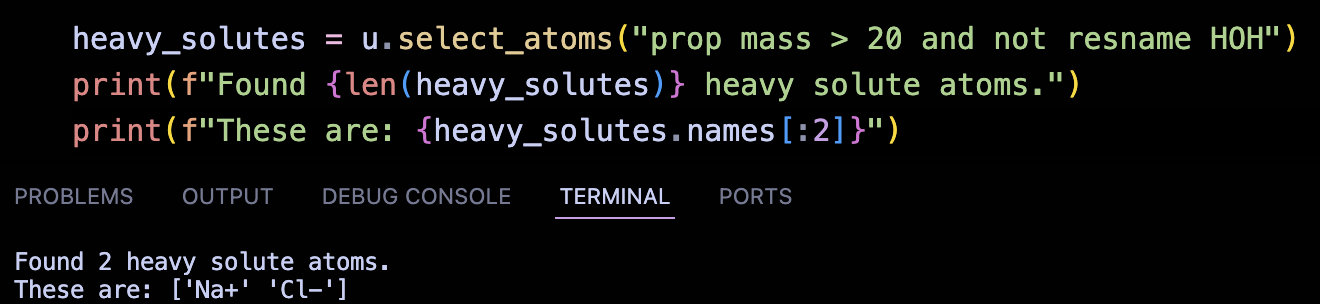
We can now calculate system-wide physical properties and perform property-based searching directly on the extracted Topology.
To ensure the parser is accurately translating the data, I wrote a suite of test cases that validate the generated Topology against the known values from WESTPA’s Tutorial 7.5.
These tests should run automatically GitHub Actions CI pipeline without failing, for this I added the west_mdacrawl.h5 and the trajectory segment files to the tests/refs directory.
This ensures that every future commit will automatically verify that our MDAnalysis integration hasn’t broken.
These tests cases have passed successfully.

The next course of action is to implement the WESTPAReader class which will expose the full WESTPA trajectory as a linear sequence of MDAnalysis
frames with correct metadata and coordinates.
Summary
- Added entry point to setup.py which will allow w_mdacrawl CLI tool to run.
- Created a w_mdacrawl.py file which will hold the CLI tool - will be implemented in a later week.
- Created the main mdacrawl.py file which will hold WESTPAParser and WESTPAReader
- Created the initial version of the WESTPAParser class which is a fully functioning parser that allows opening of west.h5 files and generates a MDAnalysis Topology.
- Wrote test cases for each part of the created Topology by referring the Tutorial 7.5 values.
- Added test .h5 and trajectory segment files to tests/refs so that the test cases run on github CI.